Desertcart purchases this item on your behalf and handles shipping, customs, and support to Faroe Islands.
🌐 Stay Connected Everywhere — Outdoor Wi-Fi That Works as Hard as You Do!
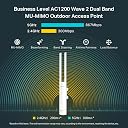
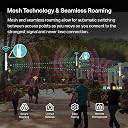
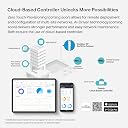
The TP-Link Omada AC1200 Outdoor Wireless Access Point (EAP225-Outdoor) delivers robust dual-band Wi-Fi speeds up to 1200 Mbps with MU-MIMO technology, ensuring multiple devices stay connected simultaneously. Its IP65-rated weatherproof design withstands harsh outdoor conditions, providing stable coverage up to 300 meters at 5 GHz. Integrated with Omada’s cloud-managed SDN platform, it offers seamless remote network control and flexible PoE-powered installation, making it the ultimate solution for professional-grade outdoor wireless connectivity.


| ASIN | B07953S2FD |
| Antenna Location | Home |
| Best Sellers Rank | #3 in Computer Networking Wireless Access Points |
| Brand | TP-Link |
| Built-In Media | AC1200 Wireless MU-MIMO Gigabit Indoor/Outdoor Access Point EAP225-Outdoor Power Adapter Mounting Kits Installation Guide |
| Color | White |
| Compatible Devices | Personal Computer |
| Connectivity Protocol | ethernet, wi-fi |
| Connectivity Range | 314159 square_meters |
| Connectivity Technology | Wi-Fi |
| Control Method | App |
| Controller Type | Switch |
| Coverage | Waterproof |
| Customer Reviews | 4.2 out of 5 stars 4,471 Reviews |
| Data Transfer Rate | 1200 megabits_per_second |
| Frequency | 2.4 GHz |
| Frequency Band Class | Dual-Band |
| Global Trade Identification Number | 00845973083571 |
| Item Dimensions L x W x H | 22"L x 16"W x 8.3"H |
| Item Highlight | Outdoor WiFi Extender Universal Compatile, Long Range, WiFi 5 Dual Band, IP65 Weatherproof, Mesh/Roaming, Omada Managed |
| Item Type Name | TP-Link AC1200 Wireless MU-MIMO Gigabit Indoor/Outdoor Access Point (EAP225-Outdoor) |
| Item Weight | 5.92 ounces |
| LAN Port Bandwidth | 10/100 megabits per second |
| Manufacturer | TP-Link |
| Maximum Upstream Data Transfer Rate | 600 megabits_per_second |
| Mfr Part Number | EAP225-Outdoor |
| Model Name | EAP225-Outdoor |
| Model Number | EAP225-Outdoor |
| Number of Items | 1 |
| Number of Ports | 1 |
| Operating System | RouterOS |
| Other Special Features of the Product | Access Point Mode |
| RAM Memory Installed | 128 MB |
| Router Network Type | hybrid |
| Security Protocol | WPA2-PSK |
| Special Feature | Access Point Mode |
| UPC | 840460605267 845973083571 |
| Voltage | 240 volts |
| Warranty Description | Limited Life Time Warranty |
| Wi-Fi Generation | Wi-Fi 5 |
| Wireless Communication Standard | 802.11ac |
| Wireless Compability | 802.11ac |
A**S
The solution that I needed!
Absolutely one of the best purchases I have made to extend my router connection to the backyard. Before purchasing, I was experiencing poor reception into my backyard and was not able to program my pool timer. I had to find a quick solution and upon searching Amazon I found the Omaha AC1200 Outdoor Wireless Access Point. Once all set up, I was able to immediately program my pool timer. The WiFi was excellent. Now I am able to have dependable WiFi while outdoors. Highly recommend.
S**M
Inexpensive upgrade!
Great upgrade over the powerline adapter I was using. Now have fast internet to my detached garage, and coverage for my entire backyard. Other than crawling under the house it was easy.
L**S
Medium range wireless extender
Ok range, not great, better than I had. My driveway is 275’ , it reaches to the end but is spotty signal wise at that range. Was installed just for a wireless security camera. The camera is about 200’ from the unit and it doesn’t get more than 1/3 bars of WiFi signal . Wouldn’t recommend for 250’ + range
M**Y
Throw the directions AWAY!
I wanted solid Wi-Fi in my backyard. I looked at all types of extenders and did a lot of research. I decided on this because unlike plug-in extenders, this does not have a universal protocol to cut your Wi-Fi speed in half (look it up). I'm giving this 5 stars because if you IGNORE the directions it works very well. The directions want you to download some software to make it work. The software needs pinholes all through your router. The software won't "contact the DB server" even with the pinholes open. The customer service is only available on normal business days, during normal business hours, when you are at work and not at home with hours to play with their non-functional software. The software needs to be updated to the latest version, all the time. The software needs a pc that is always on in order to function (it sounds like). OR..... you could just find this clearly labeled device in your list of LAN devices on your current router, give it a static IP (or a dynamic private fixed IP), go to that IP address, log in with admin admin, change it that to something secure, and then give the lower and upper Wi-Fi bands the identical username and password as your current Wi-Fi router and you're done! I downloaded a free app that lets you see your Wi-Fi strength, and walking into my backyard when the signal drops to zero, it grabs this device's signal perfectly, boosting me back to 100 percent. Coming back inside though, it hangs onto it too much and won't grab the indoor signal unless I turn my phone Wi-Fi on and off, but that takes a few seconds.
M**N
Software is God awful! Standard AP features are missing.
I bought two of these with the intention of connecting a network that has a lot of physical separation between components and subsections of the network. I want to put all my security cameras, some wired together to a switch some just WiFi connected, all on the same 10.10.10.0/24 subnet Wow has this been a disappointingly difficult device to configure and set up! Never before have I encountered password encryption implemented this way and it does not decrypt the password automatically. Never before have I had to turn on Layer 3 accessibility in order to access the device from a different subnet! Took me days to figure that one out! Very disappointing that it does not support client bridging mode,, most AP's I have used, do. And to set it up in mesh mode I will have to purchase yet another device from TP-Link. The software management GUI is clunky at best, not easy to understand many of the functions and settings. Lastly, be warned the Android app for setting up and managing these TP-Link devices is a real piece of junk! I couldn't even figure how to set a separate SSID for each band with the app, and it was difficult to figure out how with the onboard web interface. WARNING! These do NOT have a built in DHCP service so be prepared to either go with static IP addresses or run your own DHCP server. It does support having a fallback DHCP server which is really weird since I think most DHCP servers can support fallback or failover services. Hardware many be OK, but the software is real junk! Addendum, it gets even worse! The functionality of the AP is divided between the web interface on-board the AP itself and the Android app. This means you are going to have to use both. For example, you cannot set up a mesh network using the web interface of the AP. The two GUI's (Graphical User Interfaces) do NOT provide a common user experience and methods for setting up the AP. The model of the AP, as presented to the users by the two GUI's are very different and confusing because the user has to learn what, where and how to set features and settings, what are the limitations, and how to navigate the menu items. I strongly suspect these GUIs were designed by inexperienced team members (hackers) with no cross communication between those who designed the web GUI and those who designed the Android app GUI.
A**L
Works great, and a good value
I bought two of these devices, and I'm not being reimbursed or paid in any way for this review. I already have a pretty capable mesh WIFI network in place at our (large) house for our phones and mobile devices. A mesh means they all have the same SSID and password, so a device connects to whichever one is strongest once you come into range. But I recently installed a bunch of IP security cameras, and about 2/3 of them are wirelessly connected to my network. I did not want that traffic on my existing wifi network, for reasons I won't go into here. But the point is that these APs were for connecting 8 security cameras, some of them outside and a fair distance from the house! I needed two because half the cameras are on one side of the house, and the rest are on the other...No AP would have worked for all of them. Anyway, these TP-Link APs worked perfectly! They've been in place for about two months now, and they've been rock solid. One is being powered using the injector, the other is powered from a POE hub in my garage, and they both work equally well. The signal strength between these and the cameras is much stronger than the older AP I used to initially connect my cameras. I like the long, slim shape, the ability to mount them to a mast, and the adjustable antennas. The only caveat I'd include, when recommending these APs to someone, is that you cannot combine two or more of them into a mesh! So, if you're using them for mobile devices, and you want to cover a large area (like a big house, or separate buildings) with a single SSID/Password, these aren't a good choice. I knew that before I bought them! But in my case, the IP cameras are fixed in place, and they don't need the ability to connect to more than one AP...so I didn't need that feature. But, if you have a small house, or only need to accommodate an area that can be covered with a single AP, these units are an excellent value. They provide a lot of mounting options (mast, wall, vertical or horizontal, POE makes power requirements a non-issue). They have external antennas you can tweak for maximum performance, and they're inexpensive! I've installed a lot of APs (I've been in IT for 20 years, and have managed some pretty large networks). I'm impressed with these units...in fact, with ALL the TP-Link gear I've used...it performs as well as or better than equipment costing many times more. I can't say how it will hold up in the long term, but my initial impression is that it's quality gear and will continue to work well for a long time!
C**E
Reliable Wi-Fi extender for outdoor use
This review is for: TP-Link EAP225-Outdoor | Omada AC1200 Wireless Gigabit Outdoor Access Point | Business WiFi Solution w/ Mesh Support, Seamless Roaming & MU-MIMO | PoE Powered | SDN Integrated | Cloud Access & App I bought and have been using 2 of these for over 3 years. One is outdoors and the other is in my shop. They are both still working great! It took a bit to get them set up but the instructions were good and I got them up and running without issue. -Aesthetics —------- They look pretty good for what they are. They are plastic -Functionality —- They work great and function in all kinds of weather. -Value for price — They cost a bit more than other extenders but well worth it considering they still work after 3 years of use through rain, wind, snow and the heat of summers. -Ease of use —--- As with any Wi-Fi extender there is a bit of set up involved but once that's done it's easy to connect any Wi-Fi device as long as you have the password you create during setup. -Durability —------ It's plastic so it doesn't look as durable as it actually is. -Use over time— Both are still functioning well after over 3 years of continual use. Pros: Well worth every penny! Good signal, reliable, holds up and functions through all kinds of weather. Strong signal strength for a good decent distance. Cons: I don't really have any complaints I am fairly critical with my reviews, reserving; 5 stars only for products that I would highly recommend or would purchase again. 4 stars to products I like and work well but are less than perfect. 3 stars is for products that are barely usable. 2 Stars for products that I have returned or thrown away but are somewhat as described in the product description. 1 Star is for products that are falsely described in the product description and do not meet the needs of my purchase. This review reflects my honest opinion. I was not paid for this review nor was I given the product, or have any affiliation with this product.
K**7
Frustrating set up and results
Disappointed to say the least. We utilize TP Link products exclusively in our home so when I decided to extend the wifi into our back yard, I purchased this. Spent most of all day running cable and installing. Connected it to our Xfinity gateway to set it up and our internet crashed. Disconnected and started over with same result. Have to say the instructions are not very clear so I got in touch with T P Link tech support. Maybe I received a faulty unit but it never would work as a wifi extender, only as an access point with different network name and password. Not worth going through all 10 T P link cameras to change network names. Oh, before I decided to start changing all the cameras, the internet crashed again. Disconnected this access point and everything went back to normal. Very disappointing. Will return this unit and try another
A**A
Ottimo access point da esterno.
L'antenna funziona molto bene ed è ben integrata nel sistema Omada, volendo però può essere usata come semplice access point o come ripetitore di segnale. Portata buona, dipende molto dal posizionamento delle antenne. Ne ho montate 3 di cui una sul tetto, perfette.
M**1
ممتاز
عملية ورائعه
H**G
Not a bad product.
worked well. 2.4G travels further than 5G.
P**É
Top
J'en ai acheté deux le top. On peut les mettre ensemble via l'application ou par le système mèsh
E**R
Tplink con omada mejor uni...
Funciona a tooodo dar. Reitero tengo controlador, router y switch omada. Nunca tengo que ajustar nada funciona bien, precio-valor excelente
Trustpilot
1 month ago
2 weeks ago