
✈️ Take control like a pro — don’t just play, dominate the skies!
The Thrustmaster T.Flight Hotas 4 is a high-precision flight stick with a detachable throttle, designed for PC, PS4, and PS5. Featuring 12 customizable buttons, adjustable stick resistance, and an ergonomic layout, it delivers an immersive and comfortable flight simulation experience. Compatible across multiple platforms, it’s the go-to joystick for serious flight sim enthusiasts seeking precision and versatility.


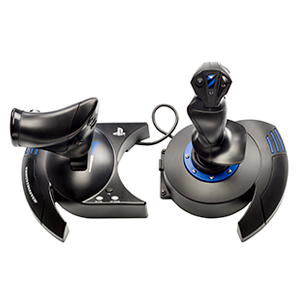

| ASIN | B076PMSYH9 |
| Are Batteries Included | No |
| Batteries | 1 Lithium Ion batteries required. |
| Best Sellers Rank | #232 in Videogames ( See Top 100 in Videogames ) #1 in Xbox One Joysticks |
| Brand | Thrustmaster |
| Color | Black |
| Computer Memory Type | DIMM |
| Customer Reviews | 4.5 4.5 out of 5 stars (6,219) |
| Date First Available | 4 November 2017 |
| Hardware Platform | PC |
| Item Weight | 2.02 Kilograms |
| Item model number | 4160664 |
| Lithium Battery Packaging | Batteries only |
| Lithium Battery Weight | 0.19 Grams |
| Manufacturer | Thrustmaster |
| Number Of Lithium Ion Cells | 1 |
| Number of Lithium Metal Cells | 1 |
| Operating System | PlayStation 5 |
| Power Source | Corded Electric |
| Product Dimensions | 26.4 x 24.2 x 26.5 cm; 2.02 kg |
| Series | Thrustmaster T.Flight Hotas 4 |
| Voltage | 1 Volts |
3**K
It’s very good
It delivered today and I can’t stop playing it!
A**B
Exceeded expectations
Fantastic deal, I like it
C**D
Good cost value
For this price, is a good coice for begginers
O**.
work perfectly well with xbox series x
no issues so far. using it on flight sim on xbox series x
S**B
Perfect thing
Perfect, i find it an amazing tool and did something more than i expected but that's a secret :) .. however, it's very good really
L**S
Does it work on Xbox one?
This is not a review it's just a question. I would like to ask does it work on Xbox one?
A**J
Microsoft Flight simulator mapping issues
Microsoft did not do the correct mapping for the hotas one yet if you will be getting it for Microsoft flight simulator you will struggle with it and you still your going to use the mouse and controller
R**.
Very bad
It doesn't work
A**H
I've been flight simming (MSFS) for 3 years now. I started off using this stick with the X-Box series X, but now use it on PC (it can work with either by toggling a switch on the stick base). I use it in split configuration so throttle to left of me and stick to right. I find it works really well like this, although the (hard attached & not USB) cable that runs between the throttle and stick bases could perhaps do with being ever so slightly longer to give more flexibilty with position. My original T.Flight Hotas One from 3 years ago had one glaring flaw, the throttle was way too loose with minimal resistance. (I saw other people complain about this too), however on this latest stock/batch/version this seems to have been rectified and it now comes with a much more smooth yet resistive feel - I was very pleasantly surprised by this. My only minor complaint is that the centre detent notch although still there is less obvious now. Another issue I previously had 3 years ago with this stick was a noisy pot (from new) on one of the axis, which meant me having to return the unit for replacement. I'm happy to say this latest one has no observable issues at all straight out of the box. I really like the simplicity of this entry level stick, but ideally TM could really do with adding a 2nd HAT switch to make it more optimal for modern flight simming. I use the single HAT switch it does have for panning cockpit views, when a 2nd HAT would be great for things like setting helicopter rotor trim with. I also like being able to change the resistance level of this stick down as I get sore wrists if I use sticks that are more rigid. It is a well made product & great value, but still packed with what for many users will be enough functionality/features but yet also manages to "keep things simple". I've actually tried more complex sticks/throttle combos, but they are either too stiff for my wrist to handle (it quickly gets to sore for me to use for long periods) or too complex to get my head around. I find there is joy to be had in simplicity and that shouldn't be overlooked. Hence the reason I bought this stick again after using the previous one for 3 years solid yet only one noisy axis having become apparent with it after all that time.
A**.
Premesso che il mio acquisto era finalizzato all'utilizzo del Flight Simulator su PC, Thrustmaster ha sviluppato una soluzione completa accompagnata da licenze ufficiali per Xbox Series X|S e Windows 10, 8 e 7., garantendo una perfetta esperienza di gioco su entrambe le piattaforme. Parliamo di un joystick entry level compatibile con una vasta gamma di giochi grazie al suo sistema di volo completo con ben 14 pulsanti azione, il grilletto di fuoco rapido e un hat switch multidirezionale. Prima di scegliere questo joystick ho letto la gran parte delle recensioni presenti ed ero titubante per via delle difficoltà incontrate dai recensori nell'assegnazione o che non ci fossero le opportune corrispondenze tra i tasti e le funzioni del Microsoft Flight Simulator. Ma per un vecchio pilota MFS (dalla versione 95), senza grosse pretese e soprattutto che non voleva (...mettiamoci che agli occhi di mia moglie "non poteva") impattare sulle spese di famiglia con l'acquisto di un joystick più professionale, ho pensato che per esplorare il pianeta comodamente dalla scrivania e fingere di traghettare persone in giro per il mondo con la mia flotta di aerei civili il T.Flight Hotas One sarebbe andato più che bene. Oltretutto devo dire non ho avuto nessun problema, in primis con l'installazione: immediata ed intuitiva. In secondo luogo con l'assegnazione dei tasti sia con FS2004, con FSX ed infine con FS2020. Essendo completamente programmabile, non capisco quale sia stato l'intoppo per gli altri, se non si utilizza il Controller a corredo con i drivers, c'è sempre il menù delle assegnazioni presente nelle impostazioni del Flight Simulator. A dire il vero è quest'ultimo che ha priorità sulle impostazioni del controller, quindi quando si avvia la simulazione si attivano le assegnazioni configurate sul Flight Simulator indipendentemente dalle configurazioni fatte sul controller per gli altri giochi. Ad ogni modo il joystick T.Flight Hotas One si distingue per il suo design ergonomico e la sua giocabilità grazie anche al poggiamano grande e la sua base appesantita per una maggiore stabilità. Avendo avuto in passato alcuni joystick più "importanti" di questo modello posso dire che la caratteristica peculiare, che ha contribuito alla reputazione acquisita dal sistema Hotas Thrustmaster nel corso del tempo, consiste nell'implementazione della manetta a grandezza naturale, tramite la quale posso facilmente controllare l'accelerazione dell’aereo. La manetta è rimovibile e può essere utilizzata in due diversi modi: staccata e separata dal joystick, per ricreare le reali condizioni di pilotaggio o attaccata al joystick, per una maggiore stabilità e per occupare meno spazio. Oltre a questo include una funzione timone abbastanza precisa, in pratica è la funzione che corrisponde ai pedali utilizzati dai veri piloti per ruotare lo sterzo, in modo tale che l'aereo si inclini lungo il suo asse verticale. In questo modo permette all'aereo di virare a destra o a sinistra senza alterare la sua altitudine. La funzione è accessibile ruotando l'impugnatura con bloccaggio integrato oppure tramite la leva ad inclinazione presente nella parte frontale della manetta. Il grilletto con il freno è ideale per il volo civile, mentre l'opzione fuoco rapido è più adatta al volo militare o spaziale. Tornando ai tasti programmabili è doveroso dire che il joystick è dotato di una memoria interna per mantenere tutti i programmi anche quando è scollegato. Forse l'unico neo, per me indifferente, è il cavo di 1,5 metri che a mio avviso è un po' troppo corto se si vuole giocare con la Xbox comodamente dal divano, d’altronde Thrustmaster ha esplicitamente progettato questo pacchetto per portare su console quella che una volta era un’esperienza principalmente orientata ai giocatori PC, il cavo corto è una specie di svista. A parte questo, considerato l'ottimo rapporto qualità prezzo, garantisco che il T.Flight Hotas One offre agli appassionati un'esperienza di volo completa e può essere una scelta intelligente soprattutto come entry level, non posso che esser soddisfatto dell'acquisto.
M**A
really good
E**7
Lo primero que me a gustado es que es 100% compatible con Xbox y con Pc. He comprado la versión con esta compatibilidad. El precio está bien y para iniciarse en el mundillo de la simulación aérea Esta muy bien. Los materiales se ven bastante buenos. Es de plástico y tiene lo justo y necesario para tener una buena experiencia Con el Fligth Simulator 2020 de Microsoft. Yo juego con las piezas separadas aunque se pueden juntar y poder usarlo las dos partes unidas mediante un sistema de fijado y una pequeña llave allen que lleva fijada debajo. Para el precio que tiene está muy bien. Por ponerle una pega esta el tema del peso. Bien podría pesar el control por separado unos 100 gramos mas el stick y el acelerador o sería ideal que llevara un sistema de pesos para poder añadirle peso y estabilidad a los controles. Luego con el acelerador tampoco espereis un tacto como el de uno de gama mas alta. La sensibilidad de este es básica pero funciona bastante bien. Añado que el Yostick es ajustable en dureza y que sí que esta mucho mas conseguido que el acelerador. Uso teclado y ratón como accesorios el mando en mi caso En el Fligth Simulator no lo uso. Le doy 5 estrellas por que para empezar en el mundo de la simulación por el precio que tiene está realmente bien y cumple a la perfección su función.
R**A
Excellent manette pour jouer en simulation de vol ! Très sympathique domage quil n’y ai pas de retour de force et des moteurs de vibration cela aurait été fantastique
Trustpilot
3 days ago
5 days ago


