Desertcart purchases this item on your behalf and handles shipping, customs, and support to Faroe Islands.
🚀 Unlock your SSD’s full potential with speed and style!
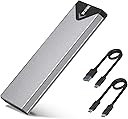
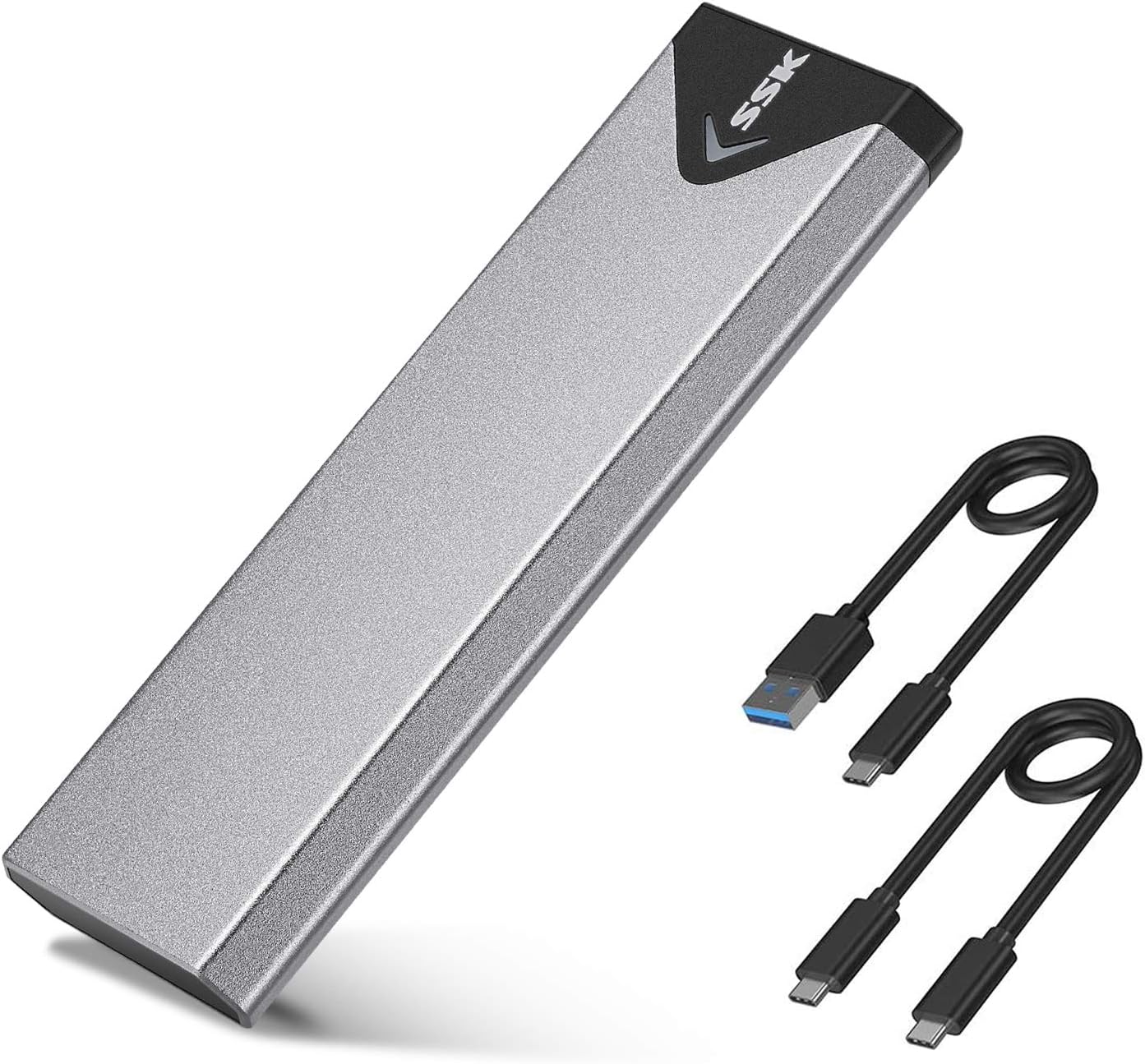
The SSK M.2 to USB NVMe SATA SSD Enclosure is a sleek, aluminum-encased adapter supporting both NVMe and SATA M-Key/B+M SSDs in 2242/2260/2280 sizes. Featuring a high-performance RTL9210B chipset, it delivers up to 10Gbps USB 3.2 Gen2 transfer speeds with advanced heat dissipation and multi-OS plug-and-play compatibility. Perfect for professionals seeking fast, reliable, and portable SSD access without the hassle of internal installation.


| Asin | B07MNFH1PX |
| Best Sellers Rank | #10 in Enclosures |
| Brand | SSK |
| Built In Media | 10Gbps USB-A Cable, 10Gbps USB-C Cable, Installation Package, heating pad |
| Color | Space Gray |
| Compatible Devices | Desktop, Laptop, Smartphone, Tablet |
| Connectivity Technology | USB 3.2 10Gbps |
| Customer Reviews | 4.5 4.5 out of 5 stars (21,677) 4.5 out of 5 stars |
| Data Transfer Rate | 10 gigabytes_per_second |
| Enclosure Material | Aluminum |
| Hard Disk Form Factor | 2.28 meters |
| Hardware Interface | USB 3.2 Gen 2 |
| Hardware Platform | USB 3.2 Gen 2, Windows/MacOs/LINUX/Android/ios |
| Item Dimensions L X W X H | 4.52"L x 1.55"W x 0.43"H |
| Item Weight | 0.1 kg |
| Manufacturer | SSK Corporation |
| Memory Storage Capacity | 4 TB |
| Mfr Part Number | SHE-C325 PRO |
| Model Number | SHE-C325 PRO |
| Number Of Items | 1 |
| Supported Devices Quantity | 1 |
| Unit Count | 1 Count |
| Warranty Description | 1 Year |
User
Fast and Well-Built SSD Enclosure with Excellent Compatibility
The SSK M.2 NVMe SATA SSD Enclosure is a compact and reliable option for turning internal SSDs into portable external drives. The enclosure feels solid thanks to the aluminum construction, which also helps with heat dissipation during longer file transfers. 💾Setup is straightforward, and the enclosure supports a wide range of SSD sizes including 2242, 2260, and 2280 drives. The connection feels stable, and transfer speeds are quick with the USB 3.2 Gen 2 10Gbps interface, especially when paired with a fast NVMe SSD.The included chipset support for UASP and TRIM adds to the overall smooth performance, and the compact design makes the enclosure easy to carry in a bag or pocket. Overall, this is a well-built and versatile SSD enclosure with fast performance and broad drive compatibility.
User
Reliable NVMe SSD Adapter for Cloning and File Transfers
I bought this NVMe SSD adapter to transfer data from my old SSD to a new one, and it worked perfectly. I also use it for transferring files, and it has been reliable so far.The adapter is easy to use and provides good transfer speeds. It does get hot during longer transfers, but I have not applied the included thermal pad yet. Adding the thermal pad should help with heat management.Overall, a good NVMe adapter that works well for SSD cloning and regular file transfers.
User
2230 length card solution so it can be supported correctly.
I saw a few questions about the device support 2230 cards. Technically, the smallest supported size is 2242. You can put in a 2230 and the cover will probably hold it in place just fine. But, a better option is to purchase in inexpensive extender card. If you search for m.2 extender cards, you'll see many options. I chose a very specific option - one that extends from 2230 to 2242 since that was all I needed. I found this production "ZDE 2PCS M.2 NGFF NVMe SSD Length Extend Adapter 2230 to 2242 Only SSD Extension Bracket" and it arrived today. I installed it making sure that the little brass joining disks was firmly seated into both the nvme board and the extender. It required a slightly firm pressure. In my case, the two boards didn't actually wind up touching, but I knew it was in correctly since the tiny screw hole at the 2242 position lined up perfectly. It feels like a solid and reliable solution. Once the little screw was installed to hold the combo in, it was very stable. I didn't see any bowing of the two boards, everything remained flat. This should hold the 2230 nvme card reliably in its connector socket. I wound up purchasing this adapter because the last adapter I tried had a jmicron chip inside which doesn't work correctly in linux - you can't get any smartctl data from the nvme card because it crashes the interface and the usb bus winds up needing to recover which can take a while. The RTL9210B chip doesn't have this issue on Linux. Following guidance from google search, and its AI, I wound up updating the firmware on the card from the 1.32.68 version to a slightly more current version. I did this because I also wanted to edit the firmware parameters to prevent the device from sleeping automatically. Since I was flashing anyway, I thought I would go more current and went to 1.33.98. I don't know if this is necessary, but it is easier to do before you install the nvme card in it. I'm using this device as part of a mirror and didn't want random errors caused by inadvertent sleeping. For normal use, I don't believe this is necessary. Once I plugged it into Linux it worked perfectly. I didn't have any of the issues the jmicron based controller was causing. Now I can monitor for wear on the flash and proactively replace the drive when it has had too many writes. The nvme card I am using is a lower end card and therefore isn't expecting heavy write loads. The card came with two cables. For some reason the usb-c cable was a little loose on the computer port end so I wound up using the USB-A cable. I think that is more a factor of my usb-c port clearance in my custom enclosure.
User
A must have for drive cloning! Maximum Speed is 1000mb/s Read + Write
This is a life saver and a must have to clone drives. Up until about two months ago there were no NVME compatible external drive enclosure on the market and the only m.2 enclosures were SATA drive compatible, NOT NVME. Most laptops only have one drive slot and whenever you wanted to clone a laptop drive, you had to undergo a long tedious multi-step process:1. Clone the laptop drive to an external hard drive via USB2. Remove the old NVME SSD3. Install the new NVME SSD4. Use some sort of bootable cloning usb drive like Macrim Reflect to copy the contents of the external USB drive to the new drive.5. Restart and pray that it works and that nothing got messed up along the way.6. If it does't boot or messes up, repeat the process over againWith a NVME external enclosure the process is significantly simpler:1. Plug in new NVME drive in to enclosure and plug into the USB port2. Clone old NVME SSD to new NVME SSD3. Remove old NVME SSD and replace with new NVME SSD4. Done.The old way resulted in numerous annoyances and non-boots as Windows DOES NOT boot from external drives and you must rely on third party bootable cloning apps. If any errors pop up during any step in the chain, you'd have to redo the process all over again until you get it right. With a NVME enclosure you can direct copy from laptop drive to new drive and switch out the old drive with the new directly. Much less assembling and disassembling frustration.This enclosure works exactly like it's supposed to. The build quality is good but not amazing. The bottom and tops of the drive enclosure rub and get scratched on the metal sleeve whenever the enclosure opens or closes. This can be problematic if you open and close it often, but not if you plan on putting a drive in there and leaving it there.The drive bay PCB has exposed copper veins to help conduct heat. I'm not entirely sure this does much but I suppose it's better than nothing. Also worry not as the veins would only touch the tops of the memory chips or controllers, not any exposed leads so no shorts would happen. You can also put in a thermal pad to better conduct the heat from the drive to the PCB. There is also included a nut that has a low side and high side which should fit if you have thicker double sided SSDs or single sided SSDs.The included thermal pad is great for conducting heat to the aluminum sleeve for dispelling heat. During during disk cloning and sustained data transfers, the aluminum enclosure does get quite hot . The temps do cause transfer speeds to drop. However if I grab the enclosure with my hands it cools off quickly and speeds return. There's no active fan for air circulation so hot objects stay hot. However a metal enclosure is better than none.One annoyance is that they only include a USB-C cable and no USB-C to USB-A cable. Though USB-C is superior, many older systems do not have USB-C and having a cable adapter would have been helpful.One final observation is that the maximum transfer speeds of this enclosure is 1000mb/s read and write. This is a hard cap and no matter how fast of an SSD you put in here, the max speeds are capped. I've put in drives that were capable of 3500mb/s reads and 2900mb/s writes and the max speed is 1000mb/s. I've tried it on thunderbolt to PCIE ports, the max speed is 1000mb/s. This is likely due the internal controller of the enclosure. The speed is pretty good for an external drive as few thumbsticks or USB external SSDs are capable of hitting these speeds (they're usually around 500mb/s or SATA speeds).Overall this is a pretty good and cheap drive. I have few issues with it other than the aforementioned ones.***If this review was helpful, please give me a helpful vote!***
User
How to use it best, after using it myself
It came with two sets of screws (good), but only one thermal pad with a very adhesive coating on it. If I pulled it off - especially after it was there absorbing heat for a while, it would not be like pulling off of a sticky. It seems designed for one-time SSD use, but...My advice: If the SSD needs to be used elsewhere, pulling off the adhesive pad would probably leave some hard to remove material from the SSD that you may want to use elsewhere.So: If you only want to use an SSD temporarily - just to test it, see what's on it, or re-format - DO NOT use the one-and-only adhesive pad. Use the adhesive pad ONLY if you want to use it as a more permanent SSD drive.Final comments: It works well, has a nice blinking LED that helps, it gets warm but not hot with the one-time thermal adhesive attached (like life, one-time, that's all folks), it didn't cost much, takes up very little space for such capacity, looks cool, they built it well. I give 5 stars as long as you have read everything above thus far.
User
Not the easiest to setup, but works perfectly
I bought this device after trying a different one and that one failed (it would shut down on its own after being powered up for about a minute).This particular unit has a little more complicated module installation, but it functioned perfectly, which is where it counts. I ran it continuously for some time without a glitch. I highly recommend this particular device.
User
Perfect Enclosure for My M.2 Drive
This M.2 enclosure is an excellent product. The build quality is solid, and it feels very durable. It was very easy to install my SSD inside, and it connects to my PC without any issues. The transfer speeds are great. Highly recommended.
User
Fast little portable NVME enclosure
tl;dr: Using this on a 2013 Mac Pro (yes...an old trash can Mac!) with an Intel 660p, and get pretty sustained writes of 400 MB/sec moving large video files around.I often have to copy our raw video footage (25-100 GB at a time) from our ingest station (the Mac Pro) to one our editor's workstations, as moving them around via sneakernet is much faster than the ancient ethernet connection in our suite.My biggest complaints thus far is that the included cables are rather short, although it's difficult to find longer high quality USB C cables that support the full 3.1/3.2 Gen 2 speeds this is capable of. Most of the time I end up using one of the really nice OWC Thunderbolt cables that shipped with their docks. I have also used on off-brand USB C to USB A adapter with great success and still get the 400 MB/sec sustained speeds.A number of other reviews have spoken to the temperatures these enclosures get to - our office is pretty cool all of the time and I've never had this get uncomfortably hot to touch. I also don't move files for more than 10-15 minutes at a time. I did end up swapping the included thermal pad with a dab of thermal paste right on the SSD controller chip (Arctic MX-2), which I think is allowing it to run a little bit cooler than with the pad. I believe the heat is sinking more effectively, therefore it's not getting as hot as less heat is building up inside the enclosure. The plastic tray that carries the SSD has a slight tension which presses the the controller and NAND packages against the side of the aluminum shell, so it's always got some thermal contact even without thermal pastes or the included pad.Overall I'd say these are pretty solid, I have carried this around in a back pants pocket and sat on it and not had any issues after the fact. The installation process is a breeze, and it's been fairly easy to swap the drives occasionally when I need access to another one (although realistically, these are cheap enough I should just get enough for all the drives I have kicking around here.) The screw for the drive mount and the single screw that holds the case together both have a brass fitting rather than plastic, so they won't easily strip over time.
User
Fast, robust, easy install - what's not to like?
I'd decided that I wanted to use M.2 SSD devices as part of my travelling toolkit for server builds/software installation, so was looking for a suitable caddy. I particularly wanted a solid case; on the basis of reviews I went for this one, and it doesn't disappoint on that score.In short, I'm very happy that I went down this route, especially after the surprise I got described further down in the review!I was quite impressed with first one, so I've now purchased two more of these enclosures over the last 6 months or so - another one for me and one for a family member who does a lot of video work. They're easy to put together, everything you need is in the package including a screwdriver, a thermal pad (important!) for your NVMe device and two short USB cables (USB-A to USB-C and USB-C to USB-C). The small screws (2 needed) are slightly fiddly to fit if you have chubby fingers like me, but nothing unusual there. It takes about 5 minutes including unpacking to get it ready to go.I use Samsung 970 EVO Plus (256G and 1TB) devices in the caddies. The performance I thought was pretty darn good compared with the USB3 flash drives I used before, worth the 'upgrade' to NVMe. For mid to large file transfers I see typically 300MB/s+ even using Windows copy - see the first pic. But then I upgraded my home desktop PC, fitting NVMe devices alongside a Crucial BX500 SSD. Hmm...The first file transfers were pretty much the same, around 300MB/s+ from the SSK to the Crucial SSD. But then I did a copy from the SSK caddy to one of the internal NMVe devices... oh, my...! In the second pic, you'll see the rate at 1.8GB/s (actually it was faster initially), which is probably close to the USB 3.2 max. I'd forgotten that the transfer rate for SATA SSDs was probably the limiter... What this tells you is that the controller in the caddy has properly implemented NVMe and USB 3.2 Gen 2.One thing you will want to watch for. The NVMe drives run pretty hot, more so than USB flash drives, so it's a good idea to make sure they're in free air when you use them. The thermal pad applied to the device and the aluminium body help to get the heat away, which will help the life of the device; just be aware that yes, it really does get that warm!
User
Super good and original
Super awesome and original it is made in Vietnam and really super good, and I recommend this seller too much
User
Product
Original product and operated normal
User
Alabileceğiniz en iyi NVME SSD Enclosure
Cihazı Ubuntu kurulu, Hikvision 512Gb SSD takarak test ettim, masaüstü bilgisayarımda anakart üzerinde bulunan USB 3.2 Gen 2 x 1 portunun vaad ettiği 10 Gbps hızı tamamen sunuyor, okuma ve yazma değerleri portun tam desteklediği değerleri sunuyor. Piyasada satılan türevlerine göre bu farklı kontrolcü kullanıyor ucuz olan modellerde JMS583 kullanılıyor. Resmi olarak Windows\Linux ve Mac desteği sunuyor. Ucuz olan başka modelleri tercih etmek isteyenler olabilir, içerisinden çıkan kablo bende yazma problemleri yaşattı fakat bunun içerisinden çıkan kabloda hiçbir sorun yaşamadım. Parasını kesinlikle hak eden bir ürün, içerisinden çıkan termal pedde bozulmamış, sağlam halde geldi çok memnunum.
User
Buenas prestaciones y precio
Probada con un SSD Samsung de 3500/3200 MB/s y donde, con la carcasa conectada a un puerto USB 3.1 Gen 2 de 10Gbps, me da una lectura de 1Gb/s de lectura y 750Mb/s de escritura. Desde un puerto USB 3.1 Gen 1, funciona como cabe esperar a 5Gbps, donde los resultados han sido de 460MB/s de lectura/escritura, que tampoco está nada mal para este tipo puerto.La disipación de calor es bastante buena, ya que al tener una ligera amortiguación hacía la carcasa, la almohadilla térmica está en contacto con la carcasa de aluminio, disipando mejor el calor que otras carcasas que he visto, donde la almohadilla térmica se queda al aire. En mi caso se calienta muy poco la unidad. Escribiendo grandes cantidades de datos se calienta, pero dentro de lo normal
Trustpilot
3 weeks ago
1 month ago